
Scraping is one of those skills that stayed relevant while everything else got hyped. The tools changed a lot in the last 2 years though.
If you learned Python the standard way, you know requests, BeautifulSoup and Selenium, the typical course libraries.
That trio still works but it’s no longer the best starting point for most jobs.
I will show you how the scraping metagame changed after AI got in the room.
Table of Contents
Why The Scraping Meta Changed
The first change is the output. HTML made sense when I was the one parsing it with selectors.
Now most of what I scrape goes into a model.
Markdown and JSON win on tokens and on how well a model reads them, so the libraries that produce clean markdown by default became the interesting ones.
The second change is anti-bot protection.
Cloudflare Turnstile and the commercial fingerprinting stacks behind it got good, which killed a whole class of scripts that used to pass.
The 3rd change is that scraping became an agent job. Libraries now ship MCP servers and structured output because the caller is often not a human writing a loop.
Those 3 shifts are why the libraries below exist at all.
The 5 Layers Nobody Explains
Most comparisons throw dozens of libraries into one list, which hides the fact that they do different jobs.
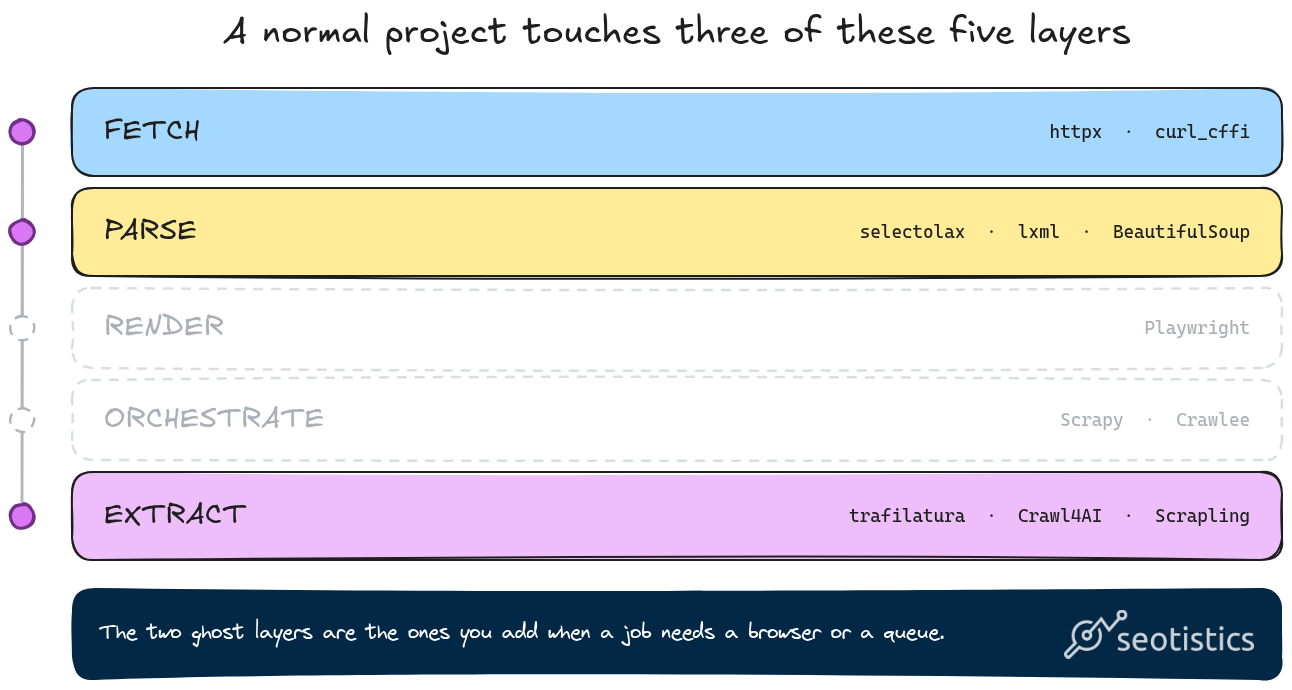
A scraping stack has five layers, so I pick one tool per layer instead of one winner overall.
- Fetch. Getting bytes, where requests is the baseline, httpx adds async with the same feel and curl_cffi spoofs the TLS fingerprint of a real browser.
- Parse. Turning HTML into something you can query, with lxml and
- Render. Running the JavaScript because the data isn’t in the HTML, where Playwright is the default and Selenium is what you maintain when a company already runs it.
- Orchestrate. Queues, retries, concurrency and proxy rotation across thousands of pages, which Scrapy and
- Extract. Deciding what content matters, either with a schema or with a model, which is where trafilatura,
A single project usually touches 3 of the 5, which is why “which library is best” is the wrong question.
| Layer | Pick | Skip it when |
|---|---|---|
| Fetch | curl_cffi, httpx | the page needs a browser anyway |
| Parse | selectolax, lxml | markup is broken, use BeautifulSoup |
| Render | Playwright | the data is in the HTML |
| Orchestrate | Scrapy, Crawlee | you scrape under 1,000 pages |
| Extract | trafilatura, Crawl4AI, Scrapling | the markup is stable and you wrote selectors |
2 notes on the classics, because every other article buries them under new tools.
Scrapy is not slow or outdated, it’s just built for a job most readers don’t have.
If you need 100,000 pages a day with retries and a queue that survives a crash, nothing in this list beats it.
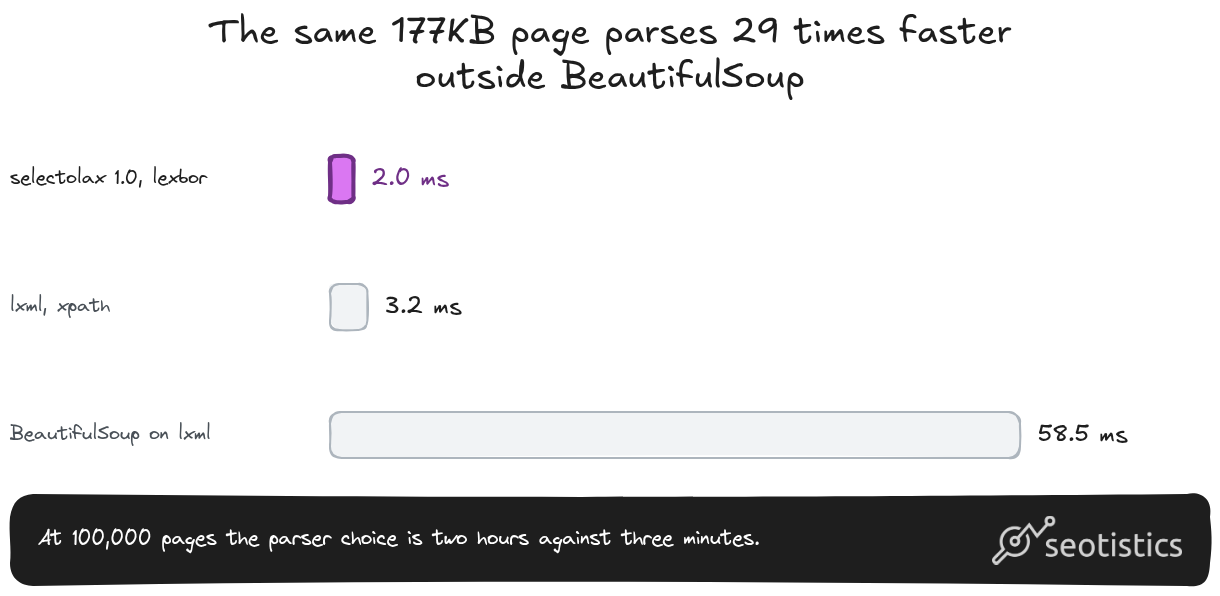
selectolax is the parser you want at volume and version 1.0 removed the old backend in a way that breaks imports.
Use from selectolax.lexbor import LexborHTMLParser, since from selectolax.parser import HTMLParser now raises an ImportError instead of quietly working.
The Libraries Compared
Details and code come after the table. The layer column matters more than the score, because two libraries in the same row are not substitutes.
| Library | Layer | Best For | Output | JS | Anti-bot | MCP |
|---|---|---|---|---|---|---|
| Trafilatura | Extract | Article content, no selectors | Text / Markdown / JSON | No | Basic | No |
| Crawl4AI | Extract | LLM-ready bulk scraping | Markdown / JSON | Yes | Limited | Yes |
| Scrapling | Extract | Selectors that survive redesigns | HTML / JSON | Optional | Stealthy | Yes |
| ScrapeGraphAI | Extract | Prompt-based extraction | JSON | Yes | Limited | Yes |
| curl_cffi | Fetch | Replacing requests | Anything | No | TLS impersonation | No |
| Playwright | Render | Pages that need JavaScript | HTML / DOM | Yes | Neutral | Yes |
| Scrapy | Orchestrate | Large recurring crawls | Anything | Manual | Basic | Yes |
| requests + BS4 | All in one | The old baseline | HTML | No | None | No |
Trafilatura: The Quiet Workhorse
Trafilatura is still the best library for content websites. It detects the useful text of a page without you writing a single selector.
Imagine scraping 100 websites, you don’t want to write custom extraction rules for each of them.
Trafilatura removes that need and it does it fast.
On a normal blog post I measured 0.02 seconds from HTML to text, which is not the bottleneck in any pipeline I’ve built.
pip install trafilatura

import trafilatura

html = trafilatura.fetch_url(url)
md = trafilatura.extract(html, output_format="markdown", include_links=True)
print(md)
The parameter that saved me time recently is output_format.
Set it to markdown when the text goes into a knowledge base and to json when you want the metadata as well.
meta = trafilatura.extract(html, output_format="json", with_metadata=True)That JSON includes the title, author, date and, usefully, the license it detected on the page. If you’re building a corpus you’ll reuse, that last field answers a legal question before it becomes one.
Avoid trafilatura for JavaScript-heavy pages because it never runs the page. For everything else, it’s the fastest path from a URL to clean content, ideal for scraping publishers and non-JS B2B SaaS.
The pipeline I run constantly: SERP data from an API, trafilatura for each result, then documents the LLM can read.
I’ll show that end to end further down.
Crawl4AI: Markdown For LLMs
Crawl4AI turns scraped pages into material a model can consume, with clean markdown as the default output.
It handles JavaScript through an async architecture and it gives you two extraction paths.
There’s a deterministic one built from CSS or XPath, plus an LLM strategy where you hand it a schema and let the model map the page.
The part I like is that it can stop before crawling a whole site, which matters when you need 40 pages out of 4,000.
pip install crawl4ai
crawl4ai-setup

from crawl4ai import AsyncWebCrawler

async def grab(url):
    async with AsyncWebCrawler() as crawler:
        result = await crawler.arun(url=url)
        return result.markdown
The one thing to know before you install it: Crawl4AI drives a browser, so the install has a browser step.
Run crawl4ai-setup once and skip it at your peril, because the failure looks like broken Python rather than a missing binary.
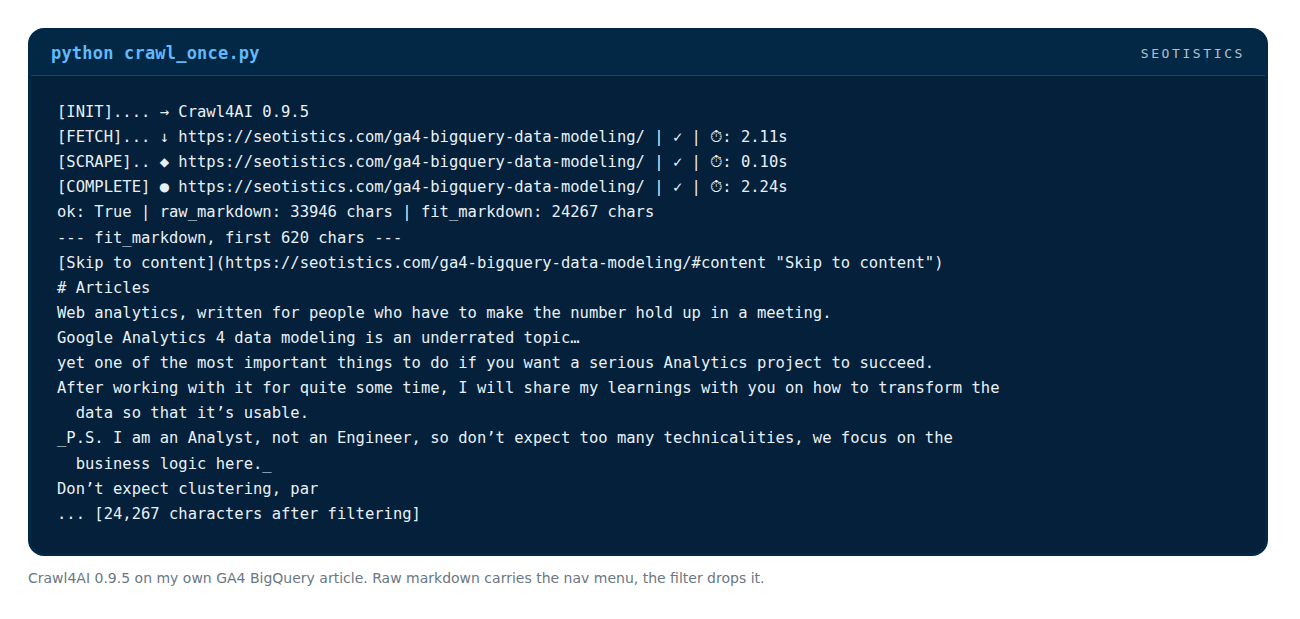
One API detail worth knowing: result.markdown prints and slices like a string, but it carries 2 versions.
On my own GA4 BigQuery article it reported 33,946 characters of raw markdown against 24,267 once I attached a content filter.
The difference is the nav menu and footer you don’t want in a corpus.
The default filter is deprecated in favour of PruningContentFilterLXML, which Crawl4AI says is about ten times faster on large pages.
It doesn’t replace traditional scrapers either.
It’s built for RAG and LLM workflows where you would otherwise spend a day writing selectors for a page you’ll scrape once.
You still pay for proxies and model calls when you scale and that cost sits on top of the machine running it.
Scrapling: When Selectors Keep Breaking
Scrapling attacks the problem that kills every long-running scraper, which is the site getting a redesign and your CSS selectors returning nothing.
Its adaptive mode saves the element you extracted, then tries to relocate it when the selector stops matching.
I tested this on a fake product page where I renamed the class between runs and it found the price again without changing the code.
from scrapling.parser import Selector

page = Selector(html, url="https://shop.example/item", adaptive=True)
prices = page.css("span.price", identifier="price", adaptive=True, auto_save=True)
After the redesign, the same call with adaptive=True and the same identifier returns the element again.
Two details cost me time: adaptive has to be enabled on the Selector constructor, otherwise the flag on css() is silently ignored and the saved elements go into a SQLite file that ships inside the package directory.
Not everything that glitters is gold though… scrapling isn’t perfect.
When I had 2 product cards on the page, it relocated the first one and missed the second, so treat it as a fallback for a single element rather than a promise that every row comes back.
The other half of Scrapling is the fetcher, which is where the stealth claims come from.
It can get through some Cloudflare challenges that stop plain requests, which is more than most libraries in this list can say.
pip install "scrapling[fetchers]"

from scrapling.fetchers import Fetcher

page = Fetcher.get(url, impersonate="chrome")
print(page.css("h1")[0].text)
That install line matters.
A plain pip install scrapling gives you the parser only and the fetch classes fail with a missing module error until you add the extra.
Scrapling also ships an MCP server, which is why it ends up inside agent workflows.
That’s a real advantage when the thing calling the library is a model instead of a script.
Some sites need proxies on top and no library fixes a page that requires a logged-in session.
ScrapeGraphAI: Prompts Instead Of Selectors
ScrapeGraphAI takes a prompt and returns structured data. You describe the fields you want and it works out the extraction.
That’s useful on irregular pages, on domains where selectors never hold and on one-off jobs where writing extraction code costs more than the extraction is worth.
It runs on credits through a hosted API, so the cost scales with pages rather than with your patience.
pip install scrapegraph-py

from scrapegraph_py import ScrapeGraphAI

sgai = ScrapeGraphAI()   # reads SGAI_API_KEY
res = sgai.extract("Extract the price, currency and stock status", url=url)
print(res.data)
That snippet is the 2.x SDK, where version 2 renamed the old Client object to ScrapeGraphAI and dropped the smartscraper() method, so most tutorials you’ll find are out of date.
There are 2 products with similar names by the same people, be careful!
Both come from the same team, and the difference is who pays for the model: the open source library uses yours, while the hosted SDK bills you in credits.
scrapegraphai is the open source library where you pass your own model, while scrapegraph-py is the hosted one above.
curl_cffi: The requests Replacement
curl_cffi is the same requests API with one big difference.
It impersonates a real browser at the TLS level, so the handshake matches Chrome instead of announcing Python.
That alone changes results.
When I ran the same five URLs through a plain HTTP client and through curl_cffi, Zillow went from a 403 to a 200 with 423KB of HTML.
pip install curl_cffi

from curl_cffi import requests

r = requests.get(url, impersonate="chrome")
print(r.text)
G2 and Glassdoor still returned 403 in the same test, which is the honest version of this story.
TLS impersonation removes one category of blocks, not all of them.
Use it as a drop-in replacement for requests in every new script.
It costs nothing to install and it turns a class of invisible failures into working requests.
HTML, Markdown Or JSON?
HTML as the final output is mostly a waste, the format should follow what happens next.
Markdown is the right default for knowledge bases, RAG and instructions, since Claude Skills read .md files and humans can edit them without fighting markup.
JSON is for structured data, when the fields matter more than the reading experience and something downstream will validate them.
In practice, you use both in the same pipeline.
Content goes out as markdown and records go out as JSON or JSONL, which is what I do when the same scrape feeds a knowledge base and a table.
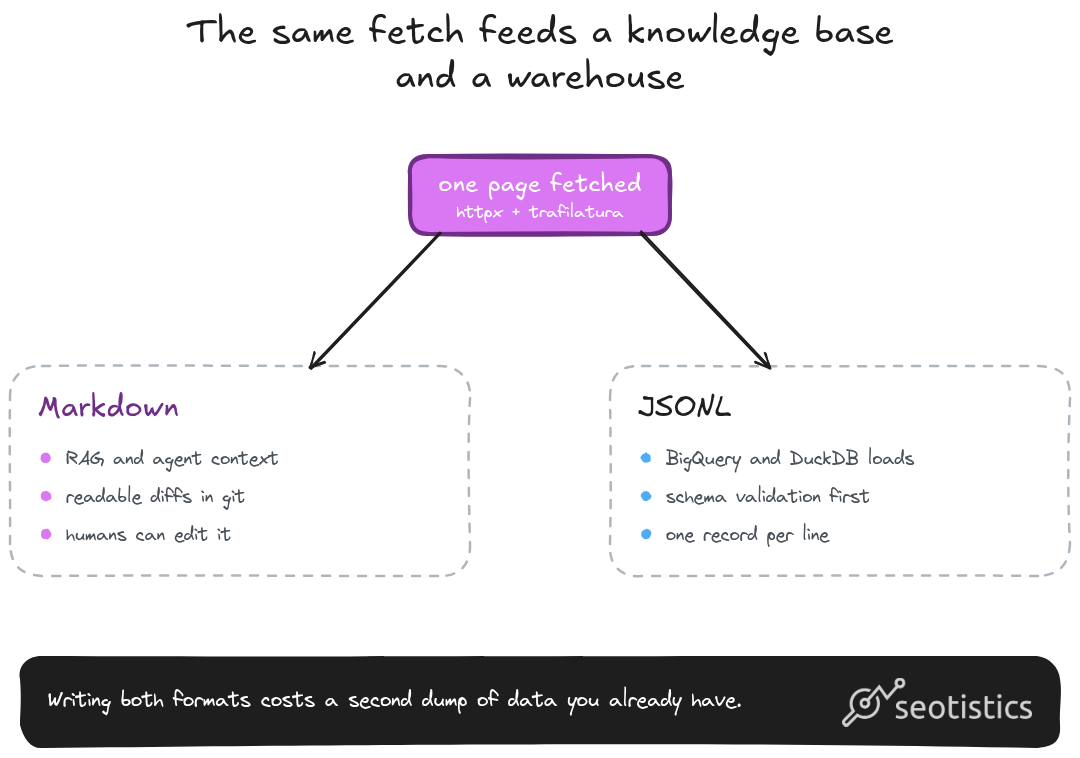
If the output is going into a warehouse, JSONL on disk and then a load into BigQuery beats a CSV every time.
What Actually Blocks You
The anti-bot conversation is usually wrong because it starts with the hardest target.
Most sites you’ll scrape for analytics work aren’t defended at all and won’t even block you.
However, Cloudflare Turnstile is good and the fingerprinting stack behind the paid tiers is better.
The ladder I climb when something returns a 403 looks like this and I ran each step on the same five URLs so the numbers are comparable.
| Step | What it fixes | Result on my five URLs |
|---|---|---|
| Plain HTTP client with a bot user agent | nothing | 4 of 5 blocked |
| curl_cffi with Chrome impersonation | TLS fingerprint | 3 of 5 blocked, Zillow now 200 |
| Playwright with a real browser | JavaScript + normal browser signals | renders, still slow per page |
| Residential proxy | IP reputation | the remaining hard blocks |
| Hosted scraping API | all of the above | works, you pay per page |
The cheapest fix is almost always the 2nd row and the most expensive mistakes come from jumping to the last one too early.
That ladder is one snapshot from one day.
NodeMaven’s 10-week Google run saw daily success for cold browsers swing from 0% to 49%, so rerun the table before you trust any row.
Amazon shows the same drift. 3 premium proxy pools moved together, from 9-12% on Sept 22 to 54-62% on Sept 29, which means one run measured the date and not the tool.
Blocked pages usually arrive as a normal 200 with a CAPTCHA inside, so count a page only when the content is there.
IP risk scores didn’t predict success in their follow-up, where 938 of 1,002 scored sessions were low risk and the higher-risk ones weren’t consistently worse.
Don’t pay for clean IP claims before you’ve tested the browser.
2 habits remove half the blocks before any tool matters.
Send a real user agent that identifies you and a contact and put a delay between requests to the same domain.
A scraper that hits a site with 50 parallel connections looks exactly like an attack because it is one!
When To Avoid Scraping (& What To Do Instead)
I scrape less than people assume since a lot of the data I want is already sold as an API or sits in a public dataset.
My order of preference is boring and it saves weeks.
If an API covers the source, buy the API. If the data is public and large, use the dataset, if neither exists, scrape it yourself.
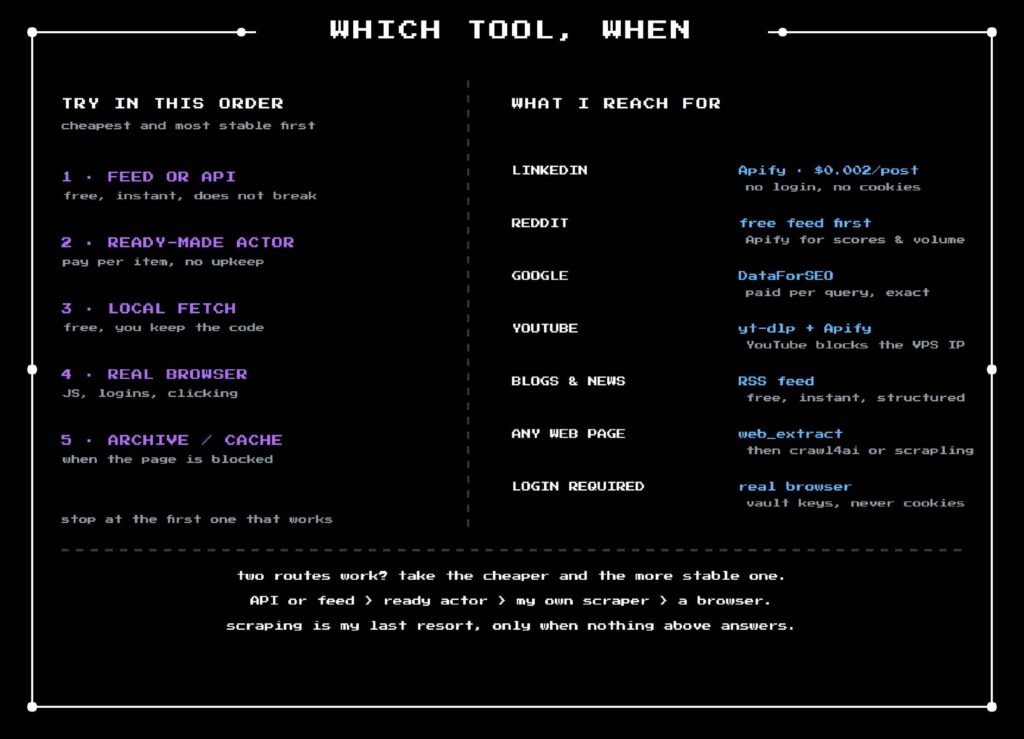
The 4 sources I never scrape directly are LinkedIn, Reddit, YouTube and Google due to their complexity, risk and price.
Apify carries the social ones from $3.20 to $4.00 per 1,000 results depending on the actor, with $5 of free credit every month.
DataForSEO carries Google at $0.60 per 1,000 SERPs on the standard queue and $2.00 live, plus $0.06 per 1,000 keywords for search volume on the standard method.
There’s a 4th option I only tested this month which changes it all.
DeepSeek ships a Fetch endpoint that takes a URL and returns the page as markdown, billed at $0.75 per 1,000 successful requests, with the same key you already use for the model.
I ran 3 of my own articles through it and each took about 27 seconds, against 0.3 seconds for a fast static page.
This points at my proof-of-work challenge being solved somewhere inside their fetcher.
Reddit and Glassdoor came back as a 404 instead, so it has a browser but no proxy fleet, while a blocked fetch is indistinguishable from a missing page.
The rate limit is the other thing to design around, because Fetch allows 25 requests a second per account.
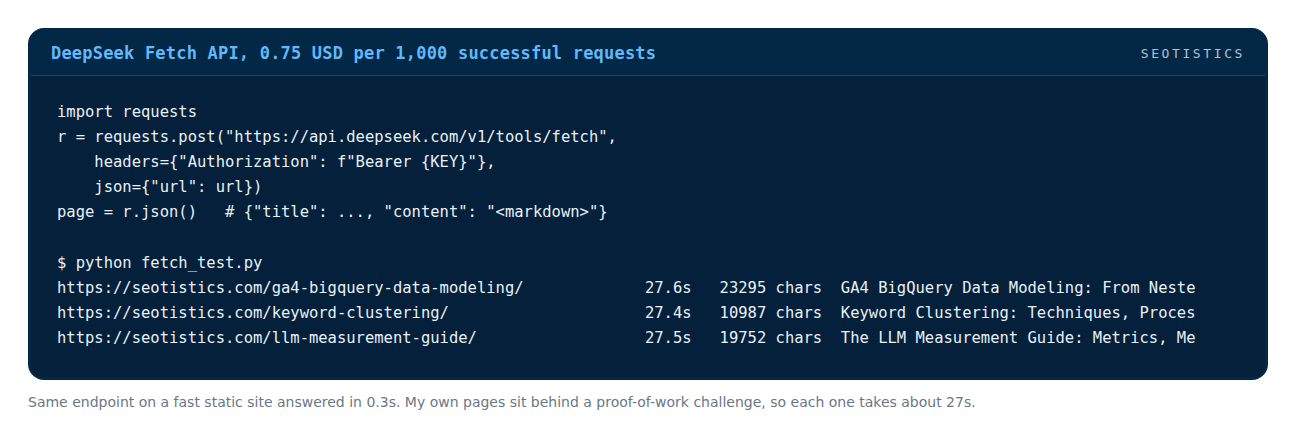
The same endpoint on my own pages takes 27 seconds each, against 0.3 seconds on a static site.
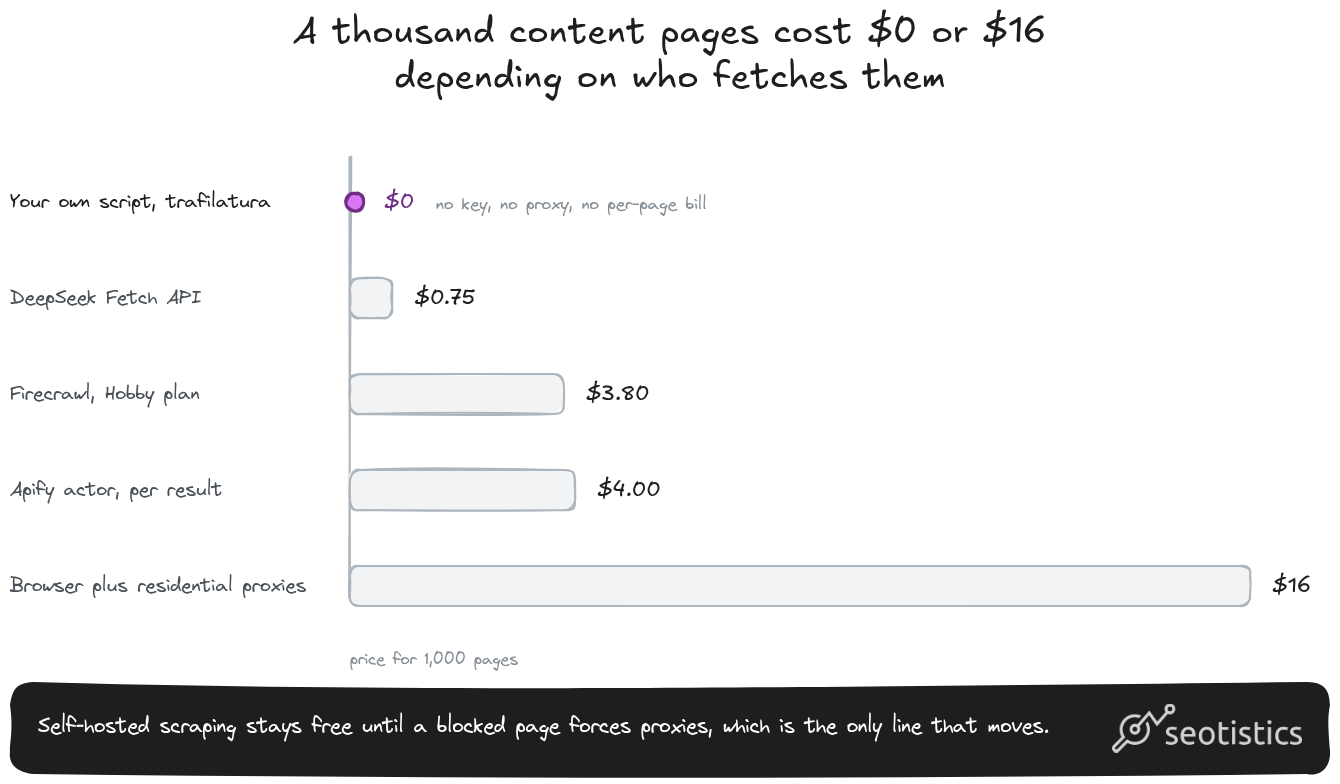
Prices read from vendor pages on November 6, 2026.
The same 1,000 pages, priced 6 ways:
| Route | Cost for 1,000 pages | What you get |
|---|---|---|
| My own script, httpx + trafilatura | about $0 | markdown, no browser, blocked on hard sites |
| Self-hosted with residential proxies | $0.40 to $0.60 | same, plus IP rotation at 100KB per page |
| Headless browser with proxies | $8 to $12 | JS rendered, at 2MB per page of proxied traffic |
| DeepSeek Fetch | $0.75 | markdown, rendered JS in my test, no proxy control |
| Firecrawl | $0 on the free tier, $3.80 on Hobby | markdown, JS handled, managed |
| Apify actor | $2.40 to $4.00 | structured records, per item |
Read the proxy rows carefully, because they’re where quotes go wrong.
Vendors sell gigabytes and you buy pages, which differ by 20 times depending on whether you take the HTML or let a browser load the images and scripts.
A blocked page still bills you for the traffic.
A Walmart results page weighed 2.37 MB in their tests while the CAPTCHA page weighed 1.45 MB, about 61% as much.
Patchright pulled CAPTCHA pages for all 400 Walmart requests, roughly 580 MB with nothing usable in it.
Price per GB hides that, so switch the metric to proxy cost per usable page.
Firecrawl is the middle road between the two worlds, since it’s a page-to-markdown API you can also self-host. One credit per page whether you scrape or crawl, which makes the free tier exactly 1,000 pages a month and $19 worth 5,000, with JSON output costing five credits a page instead of one.
Apify, Firecrawl and DataForSEO all ship an official MCP server, which is how they end up inside an agent instead of a script.
The second test is whether the data already exists in bulk.
Common Crawl has been archiving the web since 2008 and its CDX index lets you query URLs without downloading a single WARC file.
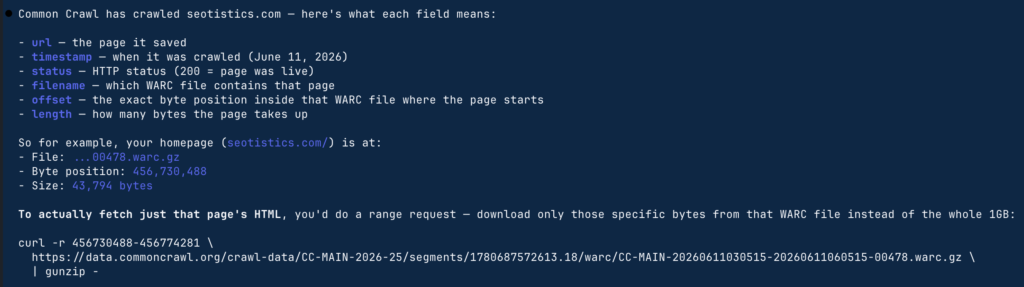
For historical domain analysis or training data built from pages that ranked years ago, that beats re-scraping the live web.
The Legal Part
Most scraping articles skip this section, which is a disservice to anyone running it for a company.
I’m not a lawyer and this isn’t legal advice, but 4 details in the case law are worth knowing before you point a scraper at someone’s site.
Public isn’t always fair game but in most cases, you shouldn’t face real issues for simple scraping on random websites (including mine lol).
robots.txt isn’t law and RFC 9309 says it in one line: these rules are not a form of access authorization.
Ignoring it still costs you because it’s the notice a plaintiff points at, while in the EU it became operative for model providers from August 2025 under the AI Act.
If your scrape touches personal data in Europe, GDPR is a bigger risk than any scraping case.
What you could actually do: a truthful user agent with a contact address, a robots.txt check, a cap on concurrency, no logged-in data, no CAPTCHA solving, provenance logged for every page and a stop when prompted.
A Pipeline You Can Run Today
This is the pipeline I actually run for competitor research and I measured it end to end on a real sitemap so you know what to expect.
The steps: collect URLs, fetch them concurrently, extract the main content, write markdown plus a JSONL record, then validate before anything touches a model.
import asyncio, json, re
from pathlib import Path
import httpx, trafilatura
from pydantic import BaseModel, field_validator

class Page(BaseModel):
    url: str
    title: str
    chars: int
    text: str

    @field_validator("text")
    @classmethod
    def not_boilerplate(cls, v):
        if len(v) < 400:
            raise ValueError("too short, probably a block page or an empty shell")
        return v

async def scrape(client, url, sem):
    async with sem:
        try:
            r = await client.get(url, timeout=30)
        except Exception:
            return None
        if r.status_code != 200:
            return None
        md = trafilatura.extract(r.text, output_format="markdown")
        if not md:
            return None
        meta = json.loads(trafilatura.extract(r.text, output_format="json", with_metadata=True) or "{}")
        try:
            return Page(url=url, title=meta.get("title") or "", chars=len(md), text=md)
        except ValueError:
            return None

async def main(sitemap):
    sm = httpx.get(sitemap, timeout=30, follow_redirects=True).text
    urls = [u for u in re.findall(r"<loc>(.*?)</loc>", sm)][:25]

    sem = asyncio.Semaphore(8)
    headers = {"User-Agent": "Mozilla/5.0 (compatible; research; you@yourdomain.com)"}
    async with httpx.AsyncClient(headers=headers, follow_redirects=True) as client:
        pages = await asyncio.gather(*[scrape(client, u, sem) for u in urls])

    ok = [p for p in pages if p]
    out = Path("scraped"); out.mkdir(exist_ok=True)
    with (out / "pages.jsonl").open("w") as f:
        for p in ok:
            f.write(p.model_dump_json() + "\n")
    print(f"{len(ok)}/{len(urls)} pages kept")
The numbers from my run against my own post sitemap at a concurrency of 8: 25 URLs in 1.5 seconds, all 25 kept and about 15,000 characters of markdown per page.
The 1st cold run of the same script took 11.7 seconds, which is roughly what an edge cache in front of WordPress is worth.
That’s about 1,000 pages a minute warm, so a 100,000 page corpus lands in under two hours on a small VPS with no API cost.
The limit is the target’s latency, not the library, so the same script on a cold site runs eight times slower and a site that answers in 80 milliseconds goes faster still.
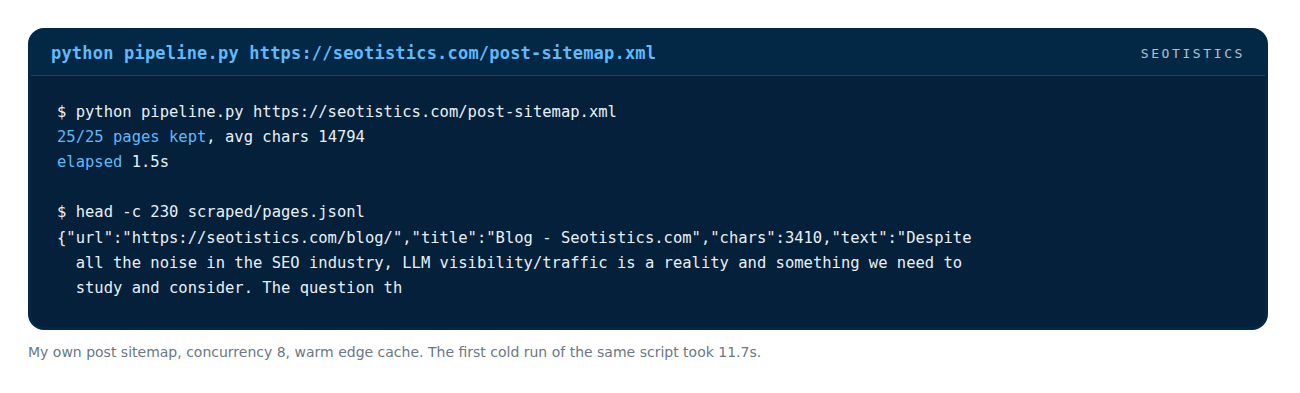
25 posts from my own sitemap, extracted and written to JSONL in 1.5 seconds.
The semaphore is what keeps you from getting banned.
The length check in Pydantic throws away block pages and cookie walls that return a 200 and JSONL is append-friendly so a crash costs you one line instead of the file.
What the script doesn’t do yet is retries.
Add them with exponential backoff on 429 and 5xx and put a per-domain delay on top.
Make It Survive A Schedule
A one-off scrape is a script that is potentially weak to errors, meaning you won’t get your nice data back.
Retries with backoff on the errors that are worth retrying, so a 503 doesn’t kill the run.
A per-domain rate limit, because one slow site shouldn’t stop the other twenty.
A robots.txt check at the start of the run, which is one request and could save you some trouble for serious projects.
A record of what changed, so you can tell a refresh from a failure.
I write one JSONL file per run and diff the keys, which is how a deleted page or a layout change shows up as a signal instead of a silent gap.
Warm the browser up before it hits the target, go visit random pages and don’t approach your target website/pages directly.
Start each run with a probe of a few requests to see what kind of day it is.
The Agentic System I Actually Run
4 rules keep a scrape alive, but rules don’t run themselves, this is the stack behind every number in this article.
n8n is the scheduler and I wrote the setup for n8n on a VPS if you want the container version.
Cron triggers the script, the script writes JSONL, the next node loads that file into BigQuery and the model step reads from the table instead of from a folder.
The other half is an agent, which for me is Hermes on the same VPS.
I describe the job, it picks the method per source from the ladder above and it writes the same JSONL as the scripted version so everything downstream stays identical.
That’s where the ladder stops being a diagram and becomes a decision the agent makes without me.
An Apify actor for a LinkedIn profile, DataForSEO for a Google SERP, trafilatura for a blog post and Crawl4AI when the page needs a browser.
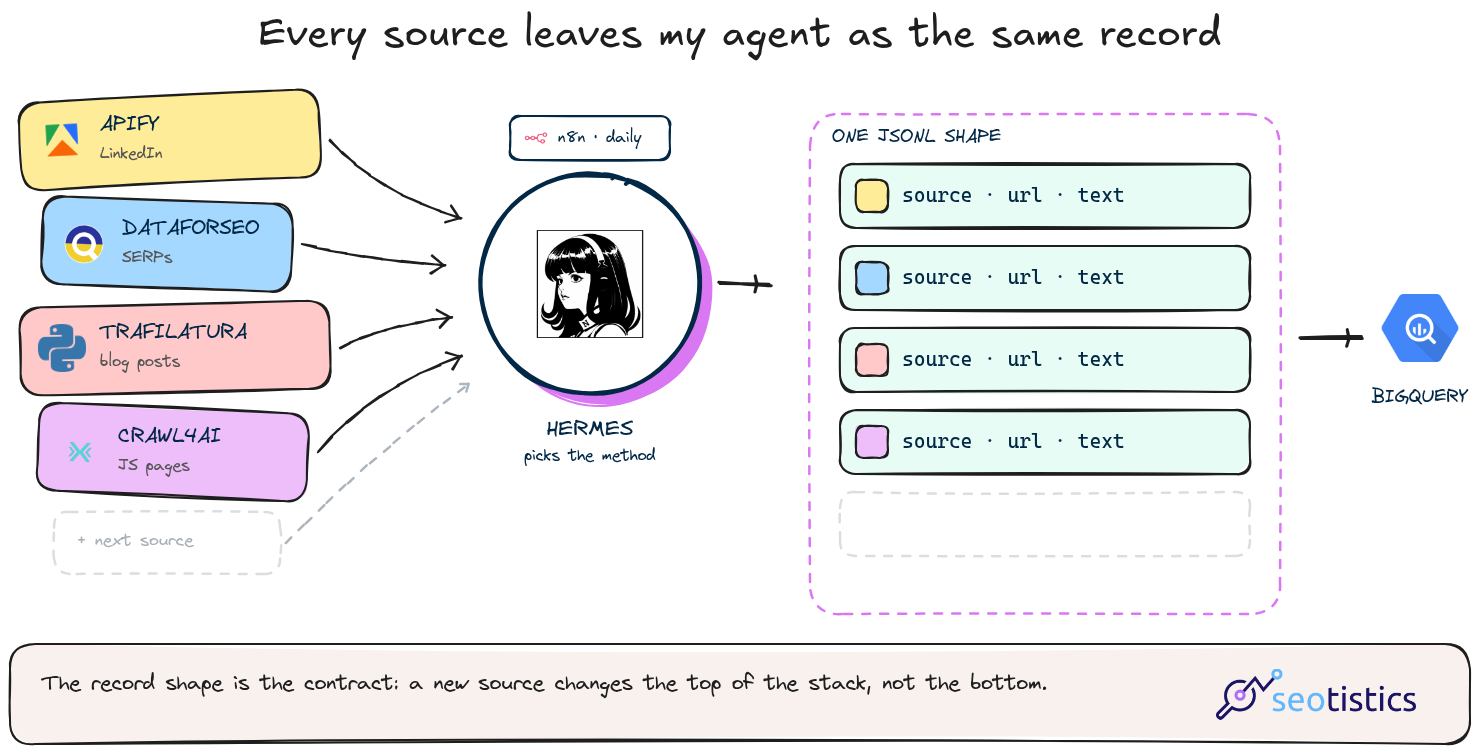
A layout changes, the extraction returns 300 characters instead of 3,000 and the length check from the pipeline is the only thing that notices.
That’s why validation sits before the model call rather than after it since a model handed an empty page will still write you a confident summary of nothing.
The analyst work starts after the load and it’s the same shape as the SERP data layer I use for keyword clustering.
Crawling Is NOT Scraping
Screaming Frog is one of the best tools out there but it’s for crawling a site you control access to and running technical checks.
That’s a different job from pulling content at scale.
It does have custom extraction, under Configuration, Custom, Custom Extraction and I use it to pull things like CTA text across a whole site.
That’s scraping with a GUI and it’s the right tool when the site is yours and the URL list comes from a crawl.
For everything else the libraries above are cheaper and more flexible.
A desktop crawler is also the wrong place to discover that you need async, retries and a queue.
What To Do Next
If you’re starting from zero, build the pipeline above against one sitemap you already know and look at what comes out of trafilatura.
10 minutes of that teaches you more than another comparison table plus you get to support yourself with LLMs!
Then, add the layer that’s missing for your actual job.
A site that needs a browser means Playwright, a recurring crawl over 50,000 pages means Scrapy or Crawlee, while pages you’ll only ever use once mean a prompt-based extractor.
In real-life scenarios today, LLMs will help more than you think, the rest is a mix of planning and bypassing blocks.